


A spam filter for AI-generated advertising emails should address unwanted content rather than guess who wrote the text. Polished language, personalization or an unusual greeting does not prove that a message was generated by AI. A legitimate supplier can also use AI to write a useful email.
The practical question is: should this message stay in your working inbox, go to a review folder or be handled by your provider’s security controls?
AI-generated advertising, ordinary sales mail or phishing?
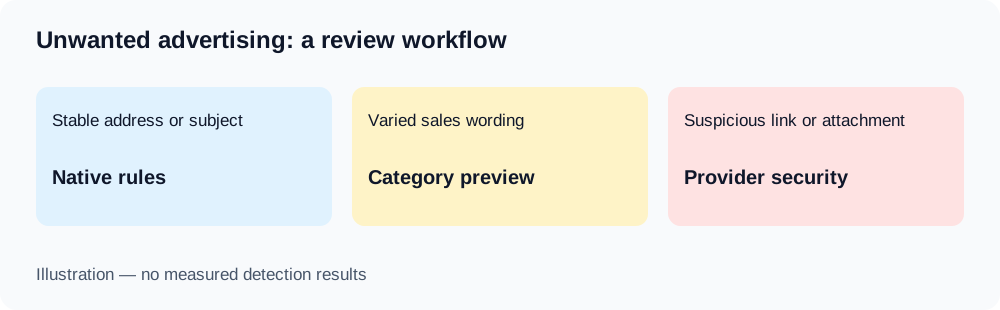
| Message | Useful first response |
|---|---|
| A newsletter you knowingly subscribed to | Review its subscription and your native sorting rules |
| Repeated unwanted pitches from one address | Use a precise sender rule or the provider’s spam-reporting control |
| Similar sales offers from changing senders | Test an intent-based category with explicit exclusions |
| Suspicious payment request, link or attachment | Use the provider’s phishing/security reporting, not an AI “safe” category |
The authoring tool is not the same as the message’s purpose. AI Email Filter does not provide a verified detector of AI authorship and is not a mail-security gateway.
Write a category that describes unwanted advertising
For a fictional business, start with this prompt:
Unsolicited sales pitches offering SEO services, advertising campaigns or contact lists. Exclude purchase invoices, account-security alerts and messages visibly referring to the listed existing support tickets or project references. Do not treat writing style alone as evidence of spam.
Replace the ticket references and contacts with approved identifiers. Avoid “Messages from companies I have never bought from”: the classifier does not automatically know your purchase history. Its per-message input is sender, subject and up to 1,000 characters of a body preview, not complete organizational context.
Configure the action separately: move matches to a dedicated advertising review folder. A sentence in the prompt does not configure that folder or guarantee that uncertain mail will remain untouched. Check excluded and unmatched messages in the preview.
Test exclusions before blocking or deleting mail
The following are fictional test cases and expected outcomes, not results of a model benchmark.
| Example | Expected review decision |
|---|---|
| “We sell qualified contact lists. Can we book a call?” | Advertising review folder |
| “Invoice for the agreed campaign, reference ACME-42” | Exclude from the advertising category |
| “Reply about existing support ticket SUPPORT-42” | Exclude from the advertising category |
| “Security alert: new login to Account Alpha” | Keep visible for authenticity checks |
| “Quick question about your business” with no clear offer | Human review; insufficient evidence |
Record your expectations, run a dry preview and inspect the originals. Count false positives separately from missed pitches. A supplier invoice incorrectly moved away is a different problem from an advertisement left in Inbox. Start with a small reviewed batch and inspect new message types after scheduling.
Understand cache, forwarding and recovery
A saved sender category can be reused conditionally. Empty subjects and absent subject patterns can permit cache eligibility; not every later message receives a new model call. Review mixed-purpose senders carefully.
History can undo supported moves while messages remain accessible. It cannot undo permanent deletion or recall a forwarded copy. Forwarding with an AI summary also attaches the original message. Keep your provider’s spam, phishing and attachment controls active.
For actual reporting steps, see Gmail’s spam guidance or Microsoft’s phishing guidance.
Is an AI-written email automatically spam?
No. Judge the request, sender context and your own consent or business workflow. This sorting method cannot reliably establish the text’s authoring tool.
Can AI Email Filter guarantee that these pitches stop?
No. It sorts mail after delivery using your categories and available message data. Use the ten prompt examples, Gmail filters and sender categories to choose a reviewable workflow.